Personalized Booking
A visual and UX refresh of the prospect-facing scheduling experience, adding personalization and modernizing the interface to build trust and improve booking confidence.
My Role
Product Designer: visual design, cross-functional feedback, interaction design
Team
Product Manager, Engineering Team
Year
2026
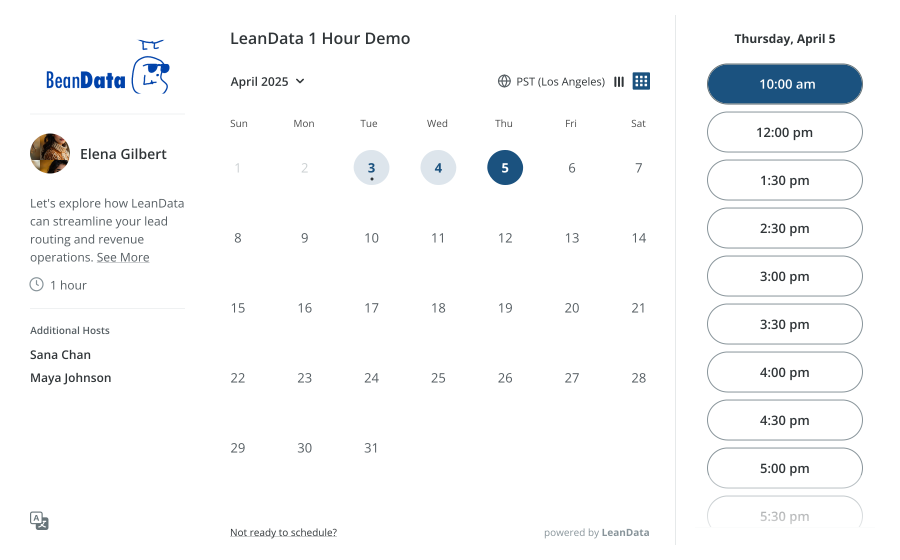
Prospect picks a date and time using the month or week calendar view
Overview
The scheduling page is where prospects book meetings with sales reps. For many buyers, it's their first direct interaction with the company. If the page doesn't feel credible, they hesitate to book.
This project combined two initiatives: rep personalization (profile pictures and host identity) to build trust, and modernizing a UI that had grown visually dated. The result is a cleaner, more human booking experience across desktop and mobile.
Context & Background
Why This Project
Enterprise customers flagged the absence of rep personalization as a gap in the prospect experience. The sidebar showed initial-based avatars and names only. No faces, no roles, nothing that signaled who prospects were about to meet.
The page also carried visual debt: gray containers, heavy shadows, and dense layouts that hadn't been refreshed in over a year. It read as dated next to Chili Piper, Calendly, and SavvyCal. Product scoped the work as a combined effort, and I used that scoping to address visual debt the team hadn't prioritized on its own.
Who Sees This Page
The primary user is a prospect: someone who received a scheduling link and now needs to pick a time, see who they're meeting, and book. For many, this is their first direct exposure to the company.
That changes the bar. Every element on the page is either building trust or eroding it.
Scope
Five areas, each mapped to a customer request or visual debt issue:
- 1.Rep profile pictures across all scheduling surfaces
- 2.UI modernization across monthly and weekly calendar views
- 3.Redesigned confirmation page
- 4.Mobile-responsive layouts
- 5.Global Styling settings tab for admin visual customization
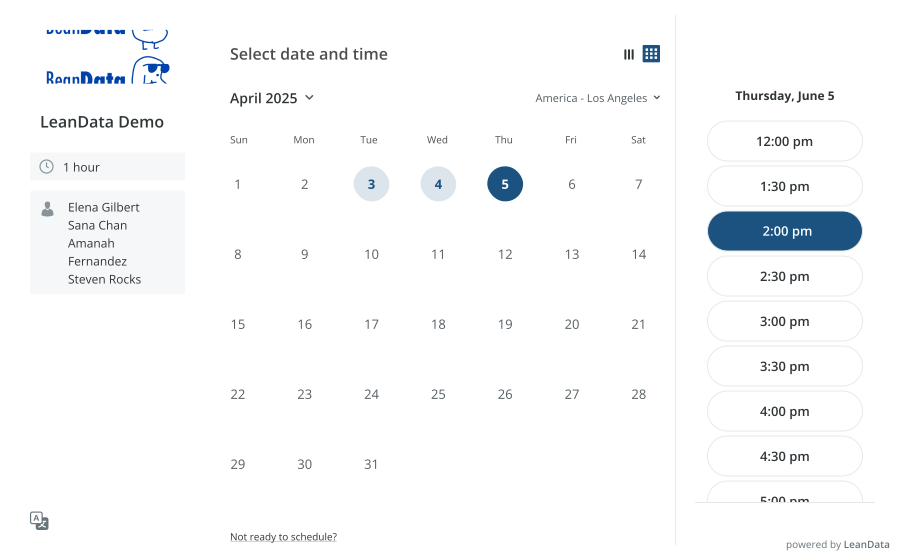
The scheduling page before the redesign
The Problem
Two issues running in parallel: a personalization gap and accumulated visual debt. Both eroded trust at the moment prospects were deciding whether to commit their time.
What Wasn't Working
- •No profile pictures. Prospects couldn’t see who they were meeting.
- •Gray containers and heavy shadows made the page feel outdated.
- •No “today” indicator; past dates surfaced prominently.
- •Week view started from the current day, breaking standard calendar conventions.
- •Confirmation page mixed host info and meeting details without clear separation.
- •Time selection column was cramped, forcing more scrolling.
What We Were Solving For
- •Trust: make it clear who the prospect is meeting.
- •Modernization: refresh the visual layer without a full rebuild.
- •Calendar clarity: intuitive navigation across month and week views.
- •Separation of concerns: split host identity from meeting logistics.
- •Density: maximize visible time slots.
- •Mobile: native phone experience, not retrofitted.
How might we make the scheduling page feel more personal, credible, and modern without a full platform rebuild?
Cross-Functional Feedback
Before committing to a direction, I ran feedback sessions with internal stakeholders. Three themes dominated the discussion, and each reshaped the design in a traceable way.
Calendar Start Day and Weekend Handling
Feedback: Stakeholders split between “Today-first” and Sun–Sat bookend layouts. A separate debate: should admins be able to hide weekends globally?
Resolution: Sun–Sat bookend, with previous days shown lighter and non-selectable. Weekend hiding flagged for customer validation.
“Every piece of feedback pushed the design toward clarity. The final experience wasn't just what I proposed. It was shaped by real disagreements from people who use the product differently.”
The Solution
Each change below traces back to a specific Problem theme or Cross-Functional Feedback resolution.
Calendar View Modernization
Removed gray containers and drop shadows. Added white space and clean borders. A “today” dot sits under the current date; previous days are lighter and non-selectable.
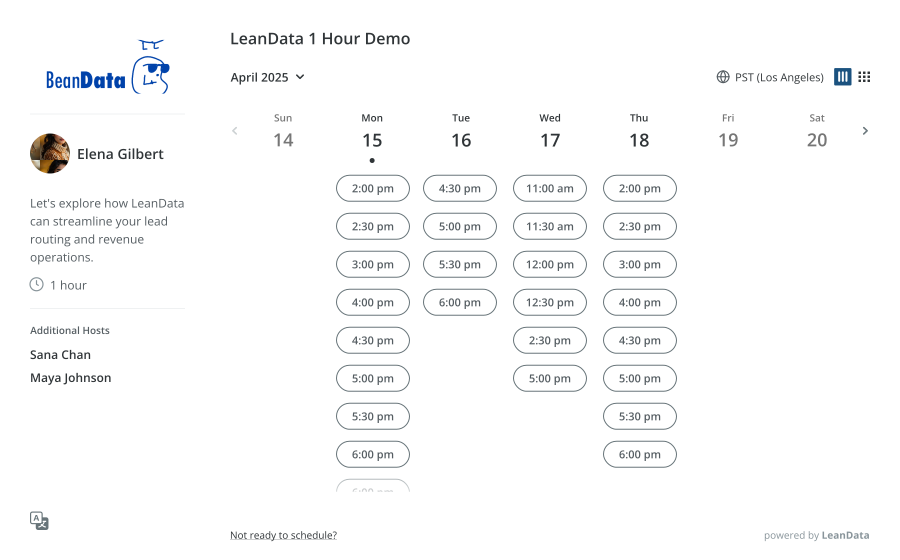
Week view now always displays Sunday through Saturday, matching the mental model prospects carry from every other calendar product. This also eliminated weekends appearing mid-grid in availability views.
Time Selection and Hierarchy
Expanded the time selection column and tucked “Powered by LeanData” inside it, surfacing more slots without scrolling. Replaced the meeting name in the primary heading with a “Select date and time” CTA that reads as an action, not a label.
Month/week toggle moved down one level in the visual hierarchy. A subtle fade was added at the bottom of scrollable sections for consistency.
More Visible Slots
Taller column reduces scrolling.
Clearer CTA
“Select date and time” as primary heading.
Scroll Fade
Signals more content below.
Confirmation Page Redesign
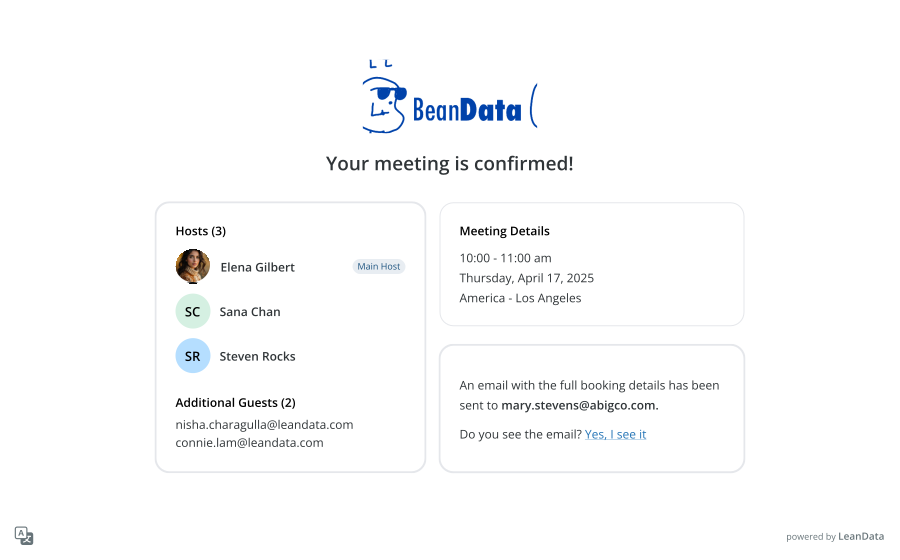
The original page stacked host info and meeting details into shared gray containers, flattening two distinct moments into one dense block. I split it into two zones: host identity on the left, meeting logistics on the right. Two questions, two answers.
Additional hosts and their profile pictures appear here, after the prospect has committed to a time. Transparency at the moment it actually matters.
Before & After
Toggle between the original and redesigned experiences. The changes are intentionally evolutionary: same core structure, meaningfully improved clarity and polish.
Mobile Experience
Many prospects open scheduling links on their phone, often between other tasks. The mobile experience had to carry the same personalization and clarity forward in a single-column layout.
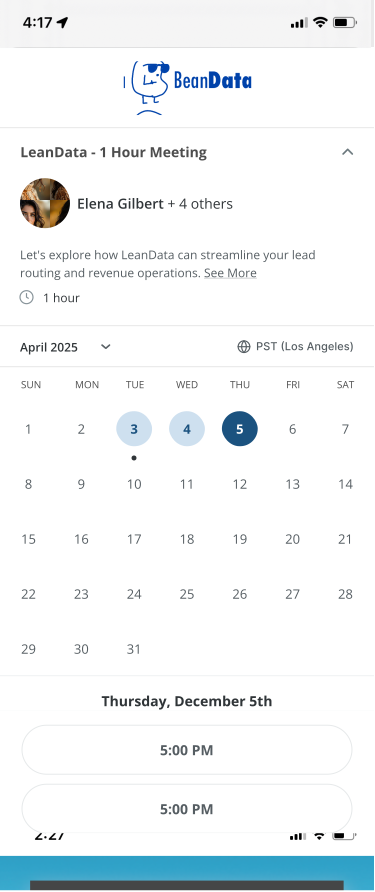
Calendar and time selection
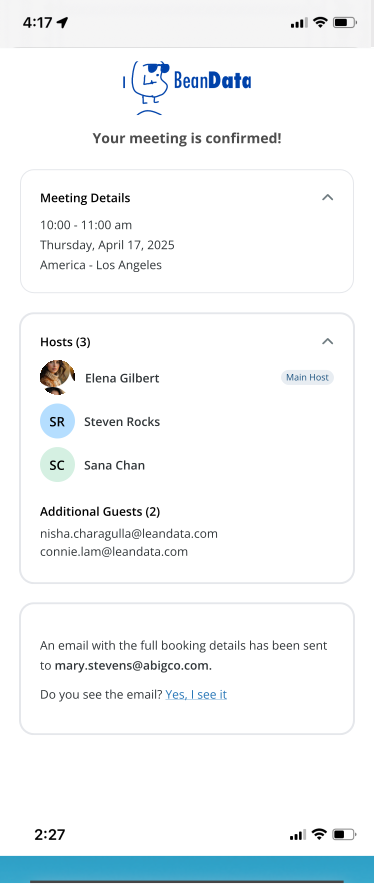
Confirmation
Reflection
What I Learned
Visual improvements carry strategic weight.
A “skin-level” refresh changed how prospects perceive the product. Removing gray containers and adding a profile picture isn’t polish. It changes how trustworthy the experience feels.
Cross-functional feedback catches blind spots early.
Running internal sessions before customer validation meant I walked into the next phase with a stronger direction. The weekend and host visibility debates surfaced patterns I had defaulted into without examining.
Constraints sharpen scope.
A targeted improvement inside an existing system on a fixed timeline forced me to prioritize the changes with the most visible buyer-facing impact.
What I'd Do Differently
Run customer interviews earlier.
External validation sooner would have helped prioritize which visual changes mattered most to prospects versus internal stakeholders.
Prototype the confirmation animation.
The team discussed a celebratory moment on booking. Due to time constraints, we had to deprioritize it, but the emotional beat of confirmation is exactly where users feel delight.
Define a success metric before ship.
No pre-agreed post-launch metric. Booking conversion, drop-off rate, or qualitative feedback would have sharpened the impact story.
“The scheduling page is the front door to every meeting. Making it feel personal and polished isn't a nice-to-have. It's how you earn the booking.”